

If you want to know How to Pass CompTIA A+ Core 2 (220-1202) with minimal anxiety, imagine sitting at your new IT helpdesk. A user walks up with a blank laptop screen, an executive complains of a frozen presentation, and a server alert flags a potential malware outbreak. Conquering this exam is not about memorizing static facts; it is about knowing exactly how to handle these high-pressure scenarios.
Every exam objective translates directly into a real-world technical solution. By exploring the four major exam domains and implementing an optimized study timeline, you will build the practical skills and confidence needed to succeed.
The 4 Domains: How to Pass CompTIA A+ Core 2 (220-1202)
CompTIA breaks the exam into four core areas. Understanding system environments, administrative workflows, and client triage is the first step in learning How to Pass CompTIA A+ Core 2 (220-1202).
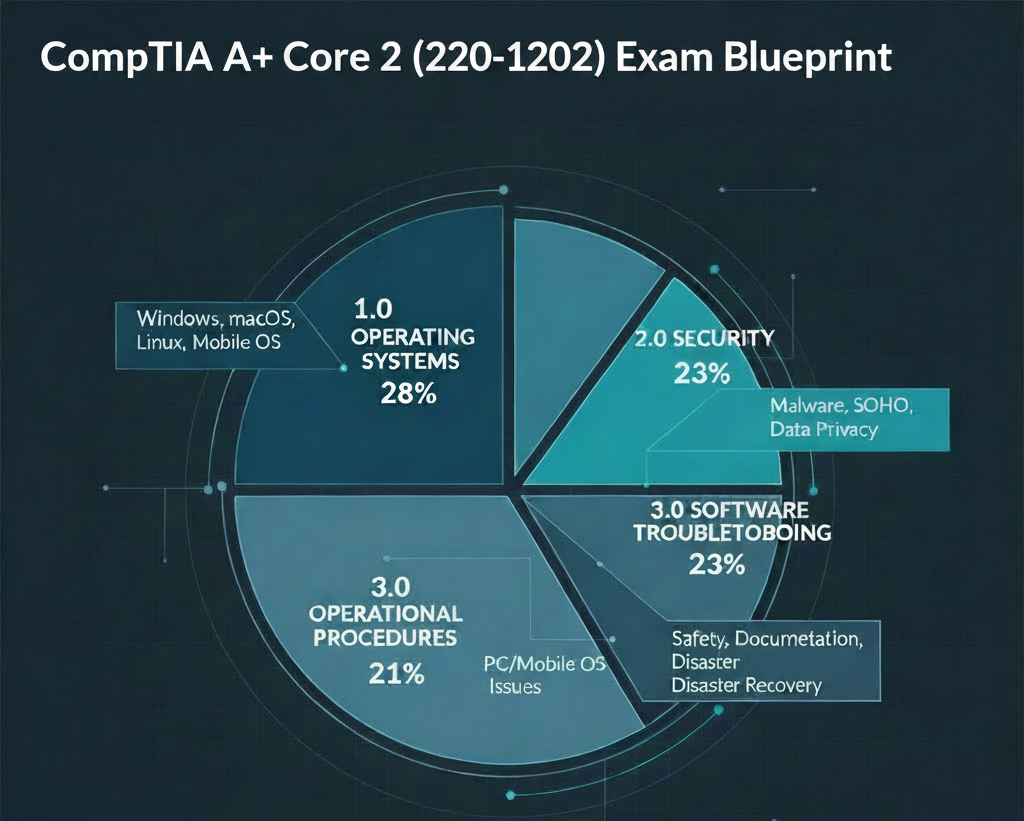
Domain 1.0: Operating Systems — How to Pass CompTIA A+ Core 2 (220-1202)
As an IT professional, you are the translator between the user and the computer’s operating system. You cannot afford to be a one-platform specialist. Mastering these distinct environments is critical when preparing for How to Pass CompTIA A+ Core 2 (220-1202).
- Taming the Windows Beast: Imagine a user submits a ticket complaining that their computer has ground to a halt. Instead of restarting the machine blindly, you will dive into administrative tools. You will launch the Task Manager to find the specific runaway background process hogging 99% of the CPU, and terminate it. You will use the Microsoft Management Console (MMC) to quickly modify local user groups or reset a locked password, and you’ll know when to open the classic Control Panel (
appwiz.cpl) versus the modern Windows Settings app to uninstall conflicting software. - Speaking Command Line: The graphical user interface (GUI) is slow; the command line is fast. When a computer drops off the network, you do not click through menus. You open the Command Prompt and type
ipconfig /releasefollowed byipconfig /renewto demand a fresh configuration from the DHCP server. - Bridging the OS Divide: Your helpdesk queue will not be exclusively Windows. When a creative designer’s Mac freezes, you must know how to invoke the Force Quit menu to kill the unresponsive software without losing their unsaved work. When an engineer asks you to modify permissions on a Linux server, you will confidently type
chmodto adjust read, write, and execute privileges, and usegrepto filter through thousands of lines of system logs to find the exact moment an application crashed.
Domain 2.0: Security — How to Pass CompTIA A+ Core 2 (220-1202)
Security is not someone else’s job—it starts with you at the helpdesk. Every device you configure, password you reset, and network you secure is a potential entry point for attackers, which is why securing systems is a primary focus of How to Pass CompTIA A+ Core 2 (220-1202).
- The Gates of Active Directory: You are the gatekeeper. You will use Active Directory (AD) to manage user accounts, assign them to security groups, and enforce password complexity. You must strictly practice the Principle of Least Privilege (PoLP): never give a user full administrative rights if they only need to update a spreadsheet.
- Hardening the Airwaves: When setting up a Small Office/Home Office (SOHO) wireless network, you will actively defend it. You will disable Wi-Fi Protected Setup (WPS) immediately because you know hackers can easily crack its 8-digit PIN. You will configure the latest WPA3 encryption, ensuring that data traveling through the air remains completely unreadable to unauthorized eyes.
- The Malware Counter-Attack: When a system gets compromised, panic is your worst enemy. Executing these steps in order is vital when discovering How to Pass CompTIA A+ Core 2 (220-1202):
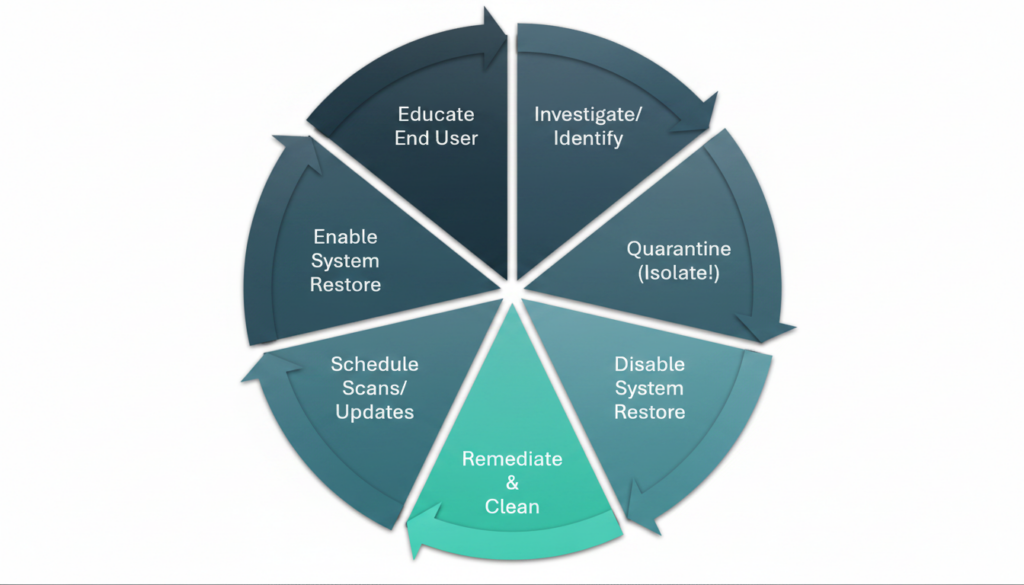
If ransomware strikes, your instinct must be immediate: unplug the network cable (Step 2: Quarantine). By isolating the system first, you stop the malware from encrypting the entire company’s shared drives. Only then do you disable System Restore, clean the system, run updates, and finally, teach the user how to avoid clicking that malicious email link again.
Domain 3.0: Software Troubleshooting — How to Pass CompTIA A+ Core 2 (220-1202)
Software breaks in predictable ways. Developing a systematic diagnostic process is essential for figuring out How to Pass CompTIA A+ Core 2 (220-1202) and acting like a skilled tech detective.
- Resuscitating Dead Boot Drives: A user panics because their computer displays a black screen with the message:
"BOOTMGR is missing". Instead of writing off the drive, you boot into the Windows Recovery Environment (WinRE). You open the command prompt and runbootrec /fixmbrandbootrec /fixbootto rebuild the master boot record. Within minutes, the operating system springs back to life. - Managing Crashes and Mobile Bugs: When an old but critical accounting app refuses to run on Windows 11, you don’t give up. You open its properties and configure Compatibility Mode to trick the software into thinking it is running on Windows 8. When a user complains that their corporate smartphone dies by lunchtime, you drill down into battery usage, force-stop the bloated application causing the drain, and clear its local cache.
- Battling Scareware: When a browser pop-up screams that the computer is infected and demands immediate payment, you don’t panic. You recognize this as fake security software (scareware). Instead of clicking “Cancel” or “OK” within the trap window, you open Task Manager, locate the browser process, and terminate it safely.
Domain 4.0: Operational Procedures — How to Pass CompTIA A+ Core 2 (220-1202)
Excellent tech skills mean nothing if you do not know how to operate within a professional team. Learning to document systems and coordinate infrastructure upgrades is a core part of How to Pass CompTIA A+ Core 2 (220-1202).
- The Power of Documentation: If you fix a problem but do not write it down, the fix does not exist. You must document every ticket with clean, reproducible notes: what the symptom was, what you tried, what actually worked, and how the user verified it. This saves your future self and your teammates hours of duplicate work.
- Playing by the Corporate Rules: You never make major changes to a live corporate network on a whim. If you need to upgrade a core network switch, you must submit a Request for Change (RFC). You will detail the exact scope of the upgrade, analyze the risks, and write a detailed backout plan to undo your changes if things go wrong.
- Protecting Your Hardware and Yourself: Before you open up a computer case to install more RAM, you must respect electrostatic discharge (ESD). You will wear an anti-static wrist strap clipped to a grounded metal frame or work on an ESD mat. This prevents a silent, invisible static shock from instantly frying a $300 motherboard.
Study Strategies: How to Pass CompTIA A+ Core 2 (220-1202)
To pass this exam with minimal stress, you must choose a study schedule that fits your current lifestyle. Adhering to a structured program is the definitive answer to How to Pass CompTIA A+ Core 2 (220-1202).
Option A: The 4-Week Methodical Plan — How to Pass CompTIA A+ Core 2 (220-1202)
This path is a highly effective answer to How to Pass CompTIA A+ Core 2 (220-1202), built for working professionals, busy parents, or absolute beginners who want to build deep, stress-free retention over time by studying 1 to 2 hours a day.
- Week 1: Explore Operating Systems. Install free virtualization software like VirtualBox on your home computer. Spin up a Linux virtual machine and a Windows evaluation copy. Spend this week practicing command-line tools in a safe, sandboxed playground where you cannot break anything.
- Week 2: Secure the Fort. Focus on logical security. Draw the 7-step malware removal process on a whiteboard until you can write it from memory. Practice configuring your home router’s security settings.
- Week 3: Troubleshoot and Document. Study common software error messages. Look through the Windows Event Viewer on your own computer to see how the OS logs errors. Read up on change management procedures and ESD safety rules.
- Week 4: Face the Practice Exams. Take timed practice tests. Treat every incorrect answer as a learning opportunity. Read the explanations carefully to understand why the correct answer is right and why the others are wrong.
Option B: The 5-Day Bootcamp — How to Pass CompTIA A+ Core 2 (220-1202)
This crash course is designed for those wondering How to Pass CompTIA A+ Core 2 (220-1202) on an accelerated timeline. It is perfect for experienced tech support workers or students on break who have 8 to 10 hours of uninterrupted daily focus.
- Day 1: System Deep Dive. Devote your entire day to Domain 1.0. Watch comprehensive video series at 1.25x speed and type out every command-line exercise in real-time.
- Day 2: Lockdown. Spend the day on Domain 2.0. Master Active Directory concepts, NTFS vs. share permissions, and security protocols.
- Day 3: Triage & Protocol. Focus on Domain 3.0 software troubleshooting and Domain 4.0 operational procedures. Create flashcards for common Windows commands and error codes.
- Day 4: Battle Testing. Take three full, 90-question practice exams back-to-back. When you hit a weak area, immediately pause and read the official documentation on that specific concept.
- Day 5: Simulations & Exam Day. Spend your morning practicing interactive simulations (like terminal troubleshooting or router configurations). Take a deep breath, head to the testing center, and pass your exam.
Framework Decision Matrix: How to Pass CompTIA A+ Core 2 (220-1202)
| Your Current Situation | Go With: 4-Week Marathon | Go With: 5-Day Sprint |
|---|---|---|
| Prior IT Experience | Zero to 6 months | 1+ years (Helpdesk, homelabs, or schooling) |
| Daily Time Available | 1 to 2 hours in the evenings | 8 to 10 fully open hours |
| Learning Style | Prefers slow digestion and practice | Thrives under tight deadlines |
Conclusion: Your Checklist for How to Pass CompTIA A+ Core 2 (220-1202)
You now hold the ultimate, low-stress blueprint on How to Pass CompTIA A+ Core 2 (220-1202). You understand how the four domains connect directly to the real world of IT support. You know how to manage Windows administrative tools, navigate terminal screens, isolate malware, and protect systems in professional corporate environments.
The strategy is in front of you. Your very next step is simple: choose your timeline. Select either the four-week marathon or the five-day sprint. Book your exam voucher today, pick a concrete date on the calendar, and commit to the daily routines of your plan. Trust your preparation, master the command line, and step into the testing room with absolute confidence.
Leave a Reply