
Aspiring network engineers, system administrators, and helpdesk specialists take the CompTIA Network+ (N10-009) exam. This test proves their ability to manage and secure enterprise networks. This completionist guide acts as your definitive roadmap. It strips away technical fluff to explain exactly how modern networking works. Use this guide to pass your exam and launch a high-paying career in IT infrastructure.
Exam Structure and PBQs for How to Pass CompTIA Network+ (N10-009)
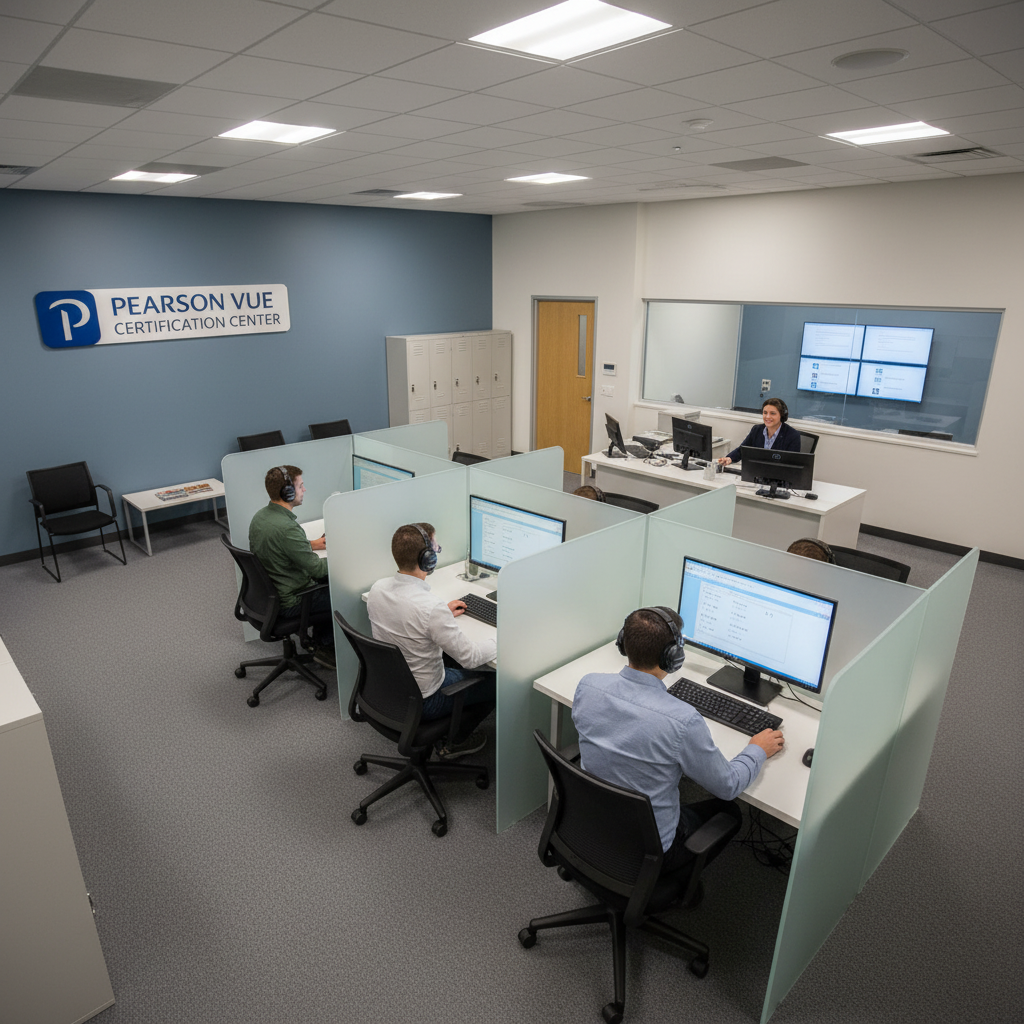
To learn How to Pass CompTIA Network+ (N10-009), you must navigate a high-stakes testing environment. This test measures both your theoretical knowledge and your hands-on skills. Pearson VUE administers the exam. They limit your testing window to exactly 90 minutes. During this period, you will face a maximum of 90 questions. CompTIA scales the final score on a range from 100 to 900 points. You must earn a minimum score of 720 to pass.
The exam uses four distinct question types to evaluate your skills as you learn How to Pass CompTIA Network+ (N10-009):
- Single-Response Multiple-Choice: You select one correct answer from four options.
- Multiple-Response Multiple-Choice: You select two or more correct answers from a list. The prompt always specifies the exact number of answers you must choose. For example, it might say “Select two.”
- Drag-and-Drop: You match network terms, arrange operational sequences, or place hardware components into logical diagrams.
- Performance-Based Questions (PBQs): These are complex, multi-step simulations. They drop you into a sandboxed network environment to solve real-world problems.
Inside the Performance-Based Questions for How to Pass CompTIA Network+ (N10-009)
PBQs serve as the core differentiator when mastering How to Pass CompTIA Network+ (N10-009). Instead of testing rote memorization, these simulations force you to apply practical engineering skills. You will interact with custom command-line interfaces (CLIs). CLIs are text-based screens where you type terminal commands. You will also use graphical user interfaces (GUIs). GUIs use visual buttons and menus to resolve specific infrastructure issues.
Common PBQ scenarios encountered in How to Pass CompTIA Network+ (N10-009) include:
- Configuring Wireless Networks: You log into a simulated wireless controller. There, you adjust Service Set Identifiers (SSIDs)—which are the public names of wireless networks. You also configure modern security standards like WPA3, and assign non-overlapping wireless channels.
- Designing Network Topologies: You drag switches, routers, firewalls, and client machines onto a workspace. Then, you connect them using the correct physical cabling standards. These include copper straight-through, crossover, or fiber-optic cables.
- Troubleshooting Routing and Switching: You analyze routing tables, configure Virtual Local Area Networks (VLANs), or verify physical interface settings to restore broken network communication.
- Implementing Access Control Lists (ACLs): You write firewall rules to block or permit network traffic. You filter this traffic based on specific IP addresses, subnets, and protocol ports.
Understanding the Scoring System of How to Pass CompTIA Network+ (N10-009)
CompTIA uses a proprietary, non-linear scoring algorithm for How to Pass CompTIA Network+ (N10-009). Because different questions carry different weights, the exact percentage of correct answers needed to pass varies. PBQs demand significant mental effort. Therefore, they represent a much larger portion of your total score than standard multiple-choice questions.
To maximize your score on How to Pass CompTIA Network+ (N10-009), use these strategic test-taking techniques:
- Skip the PBQs Initially: PBQs appear at the very beginning of the exam. They consume a massive amount of time and can cause test anxiety. Flag these questions immediately. Bypass them to answer all multiple-choice questions first. This secures rapid points and ensures you do not run out of time. Return to the PBQs once you complete the rest of the exam.
- No Penalty for Guessing: CompTIA does not deduct points for incorrect answers. Never leave any question blank before submitting your exam.
- Capture Partial Credit: CompTIA awards partial credit on PBQs and drag-and-drop questions. Even if you cannot complete an entire simulation, configure as much of the scenario as possible to capture every available point.
Domain 1: Networking Concepts for How to Pass CompTIA Network+ (N10-009)
This domain establishes the foundational theories, protocols, and addressing systems that govern how data moves across a network, which is key to learning How to Pass CompTIA Network+ (N10-009).
The 7-Layer OSI Model and Data Encapsulation
The Open Systems Interconnection (OSI) model is vital for anyone figuring out How to Pass CompTIA Network+ (N10-009). It organizes network communication into seven logical layers. Each layer performs a specific job. It prepares data for the layer directly above or below it.
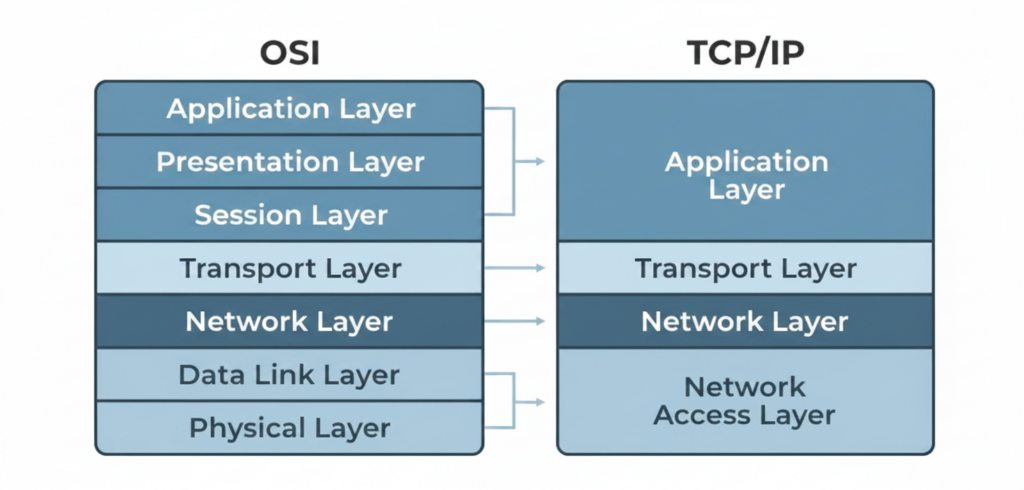
During transmission, systems executing How to Pass CompTIA Network+ (N10-009) concepts utilize encapsulation to prepare data for travel. This is the process of wrapping data with specific protocol headers at each layer:
- The Upper Layers (7, 6, 5): These layers generate the raw application data, such as an HTML webpage request.
- Layer 4 (Transport): This layer receives the data and wraps it with a Layer 4 header. This header contains the source and destination ports. It transforms the raw data into a segment (if using TCP) or a datagram (if using UDP).
- Layer 3 (Network): This layer receives the segment and adds a Layer 3 header. This header contains the source and destination IP addresses. This process converts the segment into a packet.
- Layer 2 (Data Link): This layer wraps the packet with a Layer 2 header containing source and destination MAC addresses. It also appends a trailer containing a Frame Check Sequence (FCS) to detect transmission errors. This creates a frame.
- Layer 1 (Physical): This layer converts the frame into raw electrical, optical, or wireless bits. It then transmits them across the physical medium.
When the receiving system receives the signal, it performs decapsulation. It strips the headers at each layer, moving from Layer 1 up to Layer 7. This delivers the clean application data to the target software.
Core Network Protocols and Port Configurations
When reviewing How to Pass CompTIA Network+ (N10-009), memorize these common protocols, their transport mechanisms, and their default port numbers:
- SSH (Secure Shell) / SFTP (SSH File Transfer Protocol) – Port 22 (TCP): Establishes an encrypted terminal or file transfer session to manage remote devices securely.
- DNS (Domain Name System) – Port 53 (UDP/TCP): Translates human-readable domain names like google.com into machine-readable IP addresses.
- DHCP (Dynamic Host Configuration Protocol) – Ports 67 & 68 (UDP): Automatically assigns IP addresses, subnet masks, default gateways, and DNS servers to client devices.
- HTTP (Hypertext Transfer Protocol) – Port 80 (TCP): Transmits unencrypted web traffic.
- HTTPS (HTTP Secure) – Port 443 (TCP): Transmits web traffic over an encrypted Transport Layer Security (TLS) tunnel.
- NTP (Network Time Protocol) – Port 123 (UDP): Synchronizes device clocks across the network to maintain consistent event logs.
- SNMP (Simple Network Management Protocol) – Ports 161 & 162 (UDP): Allows monitoring systems to query status information and receive event notifications from network hardware.
Transport Layer Protocols: TCP vs. UDP
The Transport Layer is a key element of How to Pass CompTIA Network+ (N10-009) that relies on two core protocols to manage data delivery:
- Transmission Control Protocol (TCP): This is a connection-oriented protocol that guarantees delivery. Before sending data, TCP establishes a logical connection using a three-way handshake:
- The client sends a SYN (Synchronize) packet.
- The server responds with a SYN-ACK (Synchronize-Acknowledge) packet.
- The client replies with an ACK (Acknowledge) packet. TCP tracks data segments using sequence numbers. The receiver sends acknowledgments back to the sender. If segments go missing, TCP retransmits them.
- User Datagram Protocol (UDP): This is a connectionless protocol that prioritizes speed over reliability. UDP sends data without establishing a handshake or verifying receipt. Applications like real-time voice, video streaming, and DNS queries use UDP. This is because dropping a few packets is better than waiting for slow retransmissions.
IPv4 Subnetting Math
An IPv4 address is another core topic when studying How to Pass CompTIA Network+ (N10-009). It consists of 32 binary bits divided into four 8-bit octets. Subnetting separates these bits into a Network ID (identifying the logical network) and a Host ID (identifying the specific device).
Deciphering CIDR Notation
Deciphering CIDR notation is essential for How to Pass CompTIA Network+ (N10-009). Classless Inter-Domain Routing (CIDR) notation uses a forward slash followed by a number. This represents how many bits belong to the network. For example, /24 means the first 24 bits are dedicated to the network. This leaves the remaining 8 bits for host addresses.
IP Address: 192.168.1.100
Subnet Mask: 255.255.255.0 (Binary: 11111111.11111111.11111111.00000000)
CIDR Notation: /24
Step-by-Step Subnet Calculation Scenario
Let’s look at a step-by-step subnet calculation scenario for How to Pass CompTIA Network+ (N10-009). We will calculate the subnet boundaries for the IP address 192.168.1.100 with a /26 mask:
- Find the Subnet Mask: A
/26mask has twenty-six 1s and six 0s.- In binary:
11111111.11111111.11111111.11000000 - In decimal:
255.255.255.192
- In binary:
- Calculate the Block Size: Subtract the value of the last non-zero octet from 256.
256 - 192 = 64- This network increments in steps of 64.
- Identify the Subnet Segments:
- Subnet 1:
192.168.1.0to192.168.1.63 - Subnet 2:
192.168.1.64to192.168.1.127 - Subnet 3:
192.168.1.128to192.168.1.191
- Subnet 1:
- Determine the Network and Broadcast IDs: The IP
192.168.1.100falls within Subnet 2 (192.168.1.64to192.168.1.127).- Network ID:
192.168.1.64(The first address in the block; reserved). - Broadcast Address:
192.168.1.127(The last address in the block; reserved). - Valid Host Range:
192.168.1.65through192.168.1.126(Addresses available for client devices).
- Network ID:
IPv6 Architecture and Auto-Configuration
IPv6 architecture represents another major conceptual pillar of How to Pass CompTIA Network+ (N10-009). It uses 128-bit addresses written in hexadecimal format. This standard solves the global shortage of IPv4 addresses.
Example IPv6 Address: 2001:0db8:85a3:0000:0000:8a2e:0370:7334
- Unicast: Sends data to a single specific node.
- Multicast: Sends data to multiple designated nodes simultaneously. IPv6 uses multicast to replace IPv4’s noisy network-wide broadcast system.
- Anycast: Sends data to the nearest node in a group of receivers sharing the same address.
- Link-Local Address: A non-routable address automatically generated by every IPv6 interface using the
fe80::/10prefix. Devices use link-local addresses to communicate on their immediate physical subnet.
SLAAC (Stateless Address Autoconfiguration)
SLAAC is a critical auto-configuration mechanism to master for How to Pass CompTIA Network+ (N10-009). It allows devices to configure their own IPv6 addresses without a DHCP server:
- The client sends a Router Solicitation (RS) multicast message to find local routers.
- The router responds with a Router Advertisement (RA) containing the local subnet prefix, such as
2001:db8::/64. - The client combines the received network prefix with its own interface identifier to generate a globally unique IPv6 address. This identifier is often derived from its MAC address using the EUI-64 process.
- The device uses NDP (Neighbor Discovery Protocol) to verify that no other system on the local segment is using that newly generated address.
Domain 2: Network Implementation for How to Pass CompTIA Network+ (N10-009)
This domain focuses on configuring and deploying devices for How to Pass CompTIA Network+ (N10-009), including switches, routers, cabling, and wireless hardware.
Switching and Routing Technologies
Switches and routers direct traffic, representing key hardware for How to Pass CompTIA Network+ (N10-009).
Virtual Local Area Networks (VLANs) and Trunking
To transport traffic for multiple VLANs, students of How to Pass CompTIA Network+ (N10-009) must understand trunking. VLANs divide a physical switch into isolated logical networks to limit broadcast traffic and enhance security.
- To transport traffic for multiple VLANs across a single physical link connecting two switches, administrators configure a trunk port.
- Trunk ports use the IEEE 802.1Q protocol to insert a 4-byte tag into the Layer 2 frame header. This tag specifies which VLAN the frame belongs to. This allows the receiving switch to forward the traffic to the correct destination VLAN.
Spanning Tree Protocol (STP)
Spanning Tree Protocol (STP) is a crucial loop-prevention technology in How to Pass CompTIA Network+ (N10-009). If you connect switches with redundant links, frames can circulate endlessly, creating a broadcast storm.
- STP (IEEE 802.1D) and the faster RSTP (Rapid STP, IEEE 802.1w) prevent these loops.
- Switches exchange BPDU (Bridge Protocol Data Unit) frames to elect a central Root Bridge.
- STP calculates the shortest path to the Root Bridge. It automatically places redundant ports into a Blocking state. If an active link fails, STP transitions the blocked port to a Forwarding state to restore connectivity.
Routing Concepts and Dynamic Protocols
Routers forward packets, which is a major concept tested in How to Pass CompTIA Network+ (N10-009) as they analyze internal routing tables.
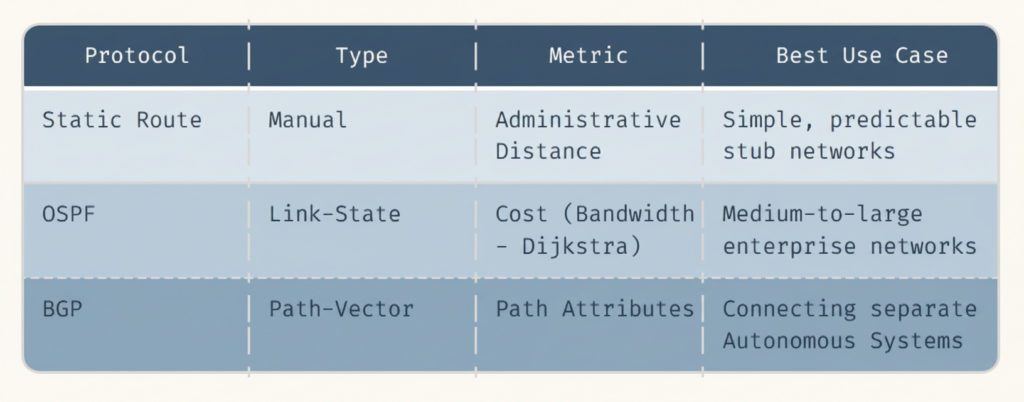
- OSPF (Open Shortest Path First): This is a link-state routing protocol designed for enterprise networks. Routers run Dijkstra’s shortest-path algorithm to build a complete map of the network topology. OSPF updates quickly and uses bandwidth (cost) as its metric.
- BGP (Border Gateway Protocol): This is a path-vector routing protocol. It manages data routing across the internet by sharing routing paths between different Autonomous Systems (AS). An AS is a large network run by an internet service provider or a massive corporation.
Physical Media and Cabling
Physical media forms the underlying foundation of How to Pass CompTIA Network+ (N10-009) objectives.
Copper Cabling Standards
Twisted-pair copper cables are highly relevant to How to Pass CompTIA Network+ (N10-009). They use RJ-45 connectors and rely on twisted wire pairs to reduce electromagnetic interference (EMI).
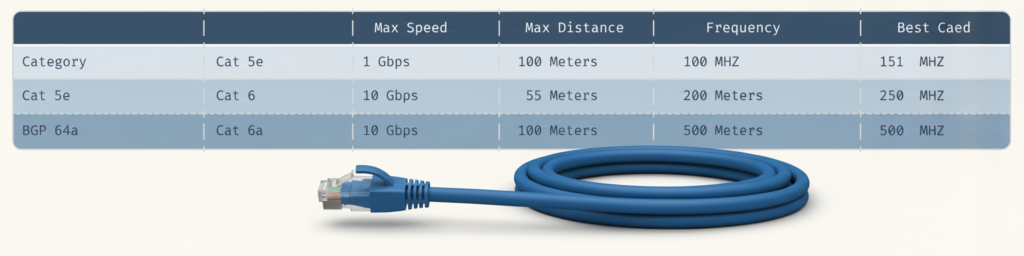
To terminate copper cables, technicians follow the EIA/TIA 568 standards:
- T568A Pinout: Green/White, Green, Orange/White, Blue, Blue/White, Orange, Brown/White, Brown.
- T568B Pinout: Orange/White, Orange, Green/White, Blue, Blue/White, Green, Brown/White, Brown.
- Straight-Through Cable: Uses the same pinning standard (A or B) on both ends. Use this to connect mismatched devices, such as a computer to a switch.
- Crossover Cable: Uses T568A on one end and T568B on the other. Use this to connect identical devices, like a switch to a switch. Modern Auto-MDIX ports also automatically detect and adjust for this cabling requirement.
Fiber-Optic Cabling
Fiber transmits data using light, a key media type in How to Pass CompTIA Network+ (N10-009). Fiber transmits data using light pulses, making it immune to EMI and capable of traversing vast distances.
- Single-Mode Fiber (SMF): Uses a narrow glass core of about 9 microns to transmit a single ray of laser light. It features low signal loss, making it ideal for long-distance backhauls stretching several kilometers.
- Multi-Mode Fiber (MMF): Uses a wider glass core of 50 or 62.5 microns to transmit multiple light paths generated by LEDs. It experiences higher modal dispersion, which is signal distortion, limiting its effective distance to short-range local data center runs.
Wireless Standards and Topologies
Wireless local area networks are heavily emphasized in How to Pass CompTIA Network+ (N10-009), allowing client devices to connect using radio waves.
- Wi-Fi 5 (802.11ac): Operates exclusively on the 5 GHz band. It delivers speeds up to 6.9 Gbps using Multi-User Multiple-Input Multiple-Output (MU-MIMO). This technology allows access points to transmit data to multiple clients simultaneously.
- Wi-Fi 6 (802.11ax): Operates on both the 2.4 GHz and 5 GHz bands. It increases efficiency in crowded environments using Orthogonal Frequency-Division Multiple Access (OFDMA). OFDMA splits channels into smaller sub-channels to transmit data to multiple devices at the same time.
- Wi-Fi 6E (802.11ax extended): Expands Wi-Fi 6 features into the uncongested 6 GHz spectrum. It provides wider channels and eliminates interference from legacy devices.
Domain 3: Network Operations for How to Pass CompTIA Network+ (N10-009)
This domain focuses on monitoring network health for How to Pass CompTIA Network+ (N10-009), maintaining documentation, and ensuring high availability to prevent downtime.
Network Monitoring and Metrics
Monitoring tools keep administrators informed, a key skill for How to Pass CompTIA Network+ (N10-009) candidates.
SNMP (Simple Network Management Protocol)
SNMP allows a central management system to track and configure network devices.
- SNMPv2c: Relies on clear-text “community strings” (essentially passwords) for authentication. This leaves the monitoring traffic vulnerable to interception.
- SNMPv3: Adds cryptographic security to protect the management session. It uses authentication (HMAC-MD5 or HMAC-SHA) to verify the sender’s identity. It also uses encryption (DES, 3DES, or AES) to secure the monitoring data.
Syslog Logging
Syslog logging is another crucial monitoring standard in How to Pass CompTIA Network+ (N10-009). Devices generate syslog messages to report local system events. Every syslog message contains a severity code ranging from 0 (Emergency) to 7 (Debug):
0: Emergency (System unusable) -> 3: Error (Critical problem) -> 7: Debug (Detailed diagnostic info)
Flow Analysis
Flow analysis helps track traffic, which is vital for How to Pass CompTIA Network+ (N10-009) networks. Technologies like NetFlow and IPFIX capture packet metadata. This includes source and destination IP addresses, ports, and packet sizes. This metadata helps track traffic flows, allowing administrators to analyze bandwidth consumption and discover which applications dominate network capacity.
Network Documentation and High Availability
Up-to-date documentation is a core operational requirement in How to Pass CompTIA Network+ (N10-009)
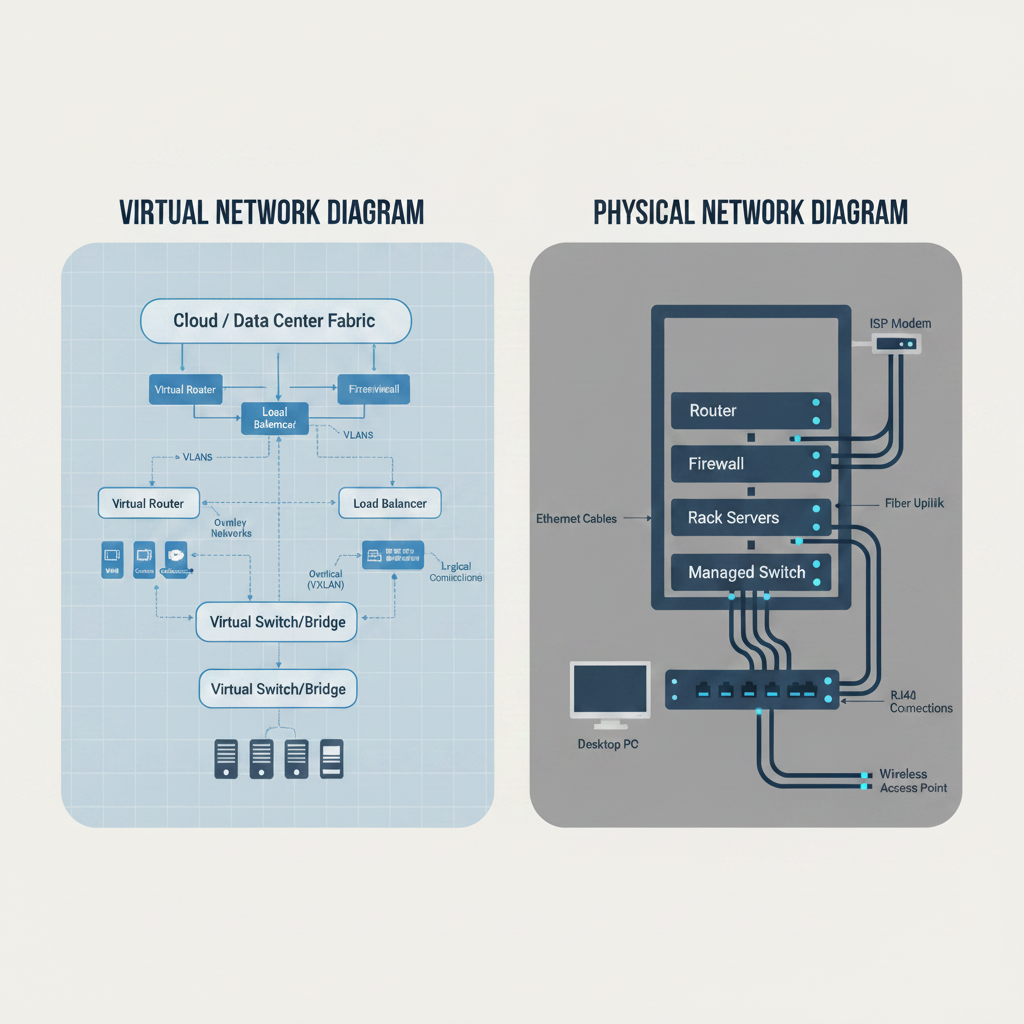
Logical vs. Physical Diagrams
- Physical Diagrams: Illustrate the exact physical layout of the hardware. They map rack locations, cable runs, patch panels, and specific physical port connections.
- Logical Diagrams: Show how data flows through the network. They map IP subnets, VLAN boundaries, routing protocols, and logical security boundaries.
High Availability (HA) Solutions
High availability (HA) solutions prevent downtime, a major focus of How to Pass CompTIA Network+ (N10-009). Engineers build redundant pathways to eliminate single points of failure:
- First Hop Redundancy Protocols (FHRP): Protocols like HSRP (Hot Standby Router Protocol) and VRRP (Virtual Router Redundancy Protocol) group multiple physical routers into a single virtual default gateway. If the primary router fails, the backup router immediately assumes control, ensuring uninterrupted routing for client machines.
- Load Balancers: Distribute incoming traffic across a farm of servers to prevent any single system from becoming overwhelmed.
Backup Methodologies
Organizations protect configurations, a key management task in How to Pass CompTIA Network+ (N10-009). They leverage structured backup schedules:
- Full Backup: Backs up every single file. This requires the most time and storage space, but it offers the fastest restoration process.
- Differential Backup: Backs up only the files that changed since the last Full backup. To restore, you need the last Full backup and the latest Differential backup.
- Incremental Backup: Backs up only the files that changed since the last backup of any type. This executes very quickly, but restoration is complex. You must restore the last Full backup and every subsequent Incremental backup in chronological order.
Domain 4: Network Security for How to Pass CompTIA Network+ (N10-009)
This domain covers securing physical and logical assets for How to Pass CompTIA Network+ (N10-009) candidates.
Access Controls and Traffic Segmentation
Segmenting network traffic is a key security measure in How to Pass CompTIA Network+ (N10-009), preventing threat actors from moving laterally.
- Stateless Firewalls: Filter traffic by checking individual packets against static Access Control Lists (ACLs). These lists contain source IP, destination IP, protocol, and port numbers. They do not track the state of network connections.
- Stateful Firewalls: Track the state of active network connections in a state table. If a client initiates a request out to a web server, the firewall automatically permits the returning traffic. It does this because it recognizes the established session. This blocks unsolicited inbound traffic.
- Next-Generation Firewalls (NGFW): Go beyond simple port and IP filtering. They perform Deep Packet Inspection (DPI) to identify specific applications, inspect encrypted payloads, and run integrated intrusion prevention systems (IPS) to block complex attacks in real time.
Device Hardening and AAA Protocols
Device hardening secures management interfaces, a core skill for How to Pass CompTIA Network+ (N10-009) network professionals.
Enforcing AAA (Authentication, Authorization, and Accounting)
The AAA framework is highly emphasized when studying How to Pass CompTIA Network+ (N10-009). It governs how users interact with network administration systems:
- Authentication: Verifies the user’s identity using a username, password, and multi-factor token.
- Authorization: Restricts what commands or configurations the authenticated user has permission to execute.
- Accounting: Logs exactly what actions, configuration changes, and commands the user executed during their session. This maintains a clear audit trail.
Enterprises implement AAA using centralized authentication protocols:
- RADIUS (Remote Authentication Dial-In User Service): This is a UDP-based protocol that encrypts only the password within the packet payload. It combines authentication and authorization into a single service. This makes it ideal for securing general user access like corporate Wi-Fi connections.
- TACACS+ (Terminal Access Controller Access-Control System Plus): This is a TCP-based protocol designed for administrative device management. It encrypts the entire communication payload. It also separates authentication, authorization, and accounting into distinct services, allowing granular command authorization for network engineers.
Baseline Hardening Steps
- Disable Unsecure Protocols: Turn off Telnet, HTTP, and SNMPv1/v2c. Enforce SSH, HTTPS, and SNMPv3.
- Disable Unused Ports: Administratively shut down physical switch ports that do not connect to authorized devices. This prevents unauthorized physical connections.
- Change Default Credentials: Change every factory-default password to a strong, unique value.
Modern Security Architectures
Modern networks protect assets using perimeter-less security for How to Pass CompTIA Network+ (N10-009) enterprises.
- Zero Trust Architecture (ZTA): Operates on the fundamental principle of “never trust, always verify.” Regardless of where a request originates, ZTA requires continuous authentication, strict access controls, and real-time posture validation.
- SASE (Secure Access Service Edge): Merges software-defined wide area networking (SD-WAN) with cloud-delivered security services. These include cloud firewalls, secure web gateways, and cloud access security brokers.
- VPN (Virtual Private Network): Establishes an encrypted tunnel across the public internet. Site-to-Site VPNs use IPsec to securely connect two office locations. Client-to-Site VPNs use SSL/TLS or IPsec to connect individual remote workers to the corporate office.
Domain 5: Network Troubleshooting for How to Pass CompTIA Network+ (N10-009)
Troubleshooting requires you to systematically isolate problems for How to Pass CompTIA Network+ (N10-009) candidates. As the most heavily weighted domain, troubleshooting requires you to systematically isolate and resolve network problems using structured methodologies and diagnostic tools.
The 6-Step Troubleshooting Methodology
CompTIA requires you to execute a rigid troubleshooting process for How to Pass CompTIA Network+ (N10-009). Do not guess; follow these steps in order:
Step 1: Identify the Problem
  └── Question user, duplicate problem, gather symptoms.
Step 2: Establish a Theory of Probable Cause
  └── List obvious causes, eliminate unlikely options.
Step 3: Test the Theory to Determine the Cause
  └── Verify theory. If failed, establish a new theory.
Step 4: Establish a Plan of Action & Implement the Solution
  └── Schedule change, make the fix, avoid side effects.
Step 5: Verify Full System Functionality
  └── Test connection, apply preventive measures.
Step 6: Document Findings, Actions, and Outcomes
  └── Write down what broke and how you fixed it.
- Identify the Problem: Question the user to gather clear symptoms. Duplicate the issue if possible, identify recent changes to the environment, and establish the scope of the outage.
- Establish a Theory of Probable Cause: Brainstorm logical reasons for the failure. Start with the easiest, most obvious causes. For example, check if a physical cable is unplugged before moving to complex configurations.
- Test the Theory to Determine the Cause: Run tests to see if your theory is correct. For example, you can ping the default gateway to check Layer 3 connectivity. If the test confirms your theory, proceed to the next step. If your test fails, return to Step 2 to establish a new theory.
- Establish a Plan of Action and Implement the Solution: Write out a step-by-step plan to fix the issue. Ensure you understand any side effects of the change, obtain administrative approval, and make the physical or configuration modification.
- Verify Full System Functionality: Verify that the system works perfectly. If applicable, implement preventive measures. These can include updating security policies or replacing worn cables to ensure the issue does not occur again.
- Document Findings, Actions, and Outcomes: Log the symptoms, root cause, and implementation steps in the central ticketing system. This provides a clear knowledge base to help resolve future outages.
Diagnostic Command-Line Tools
You must master command-line utilities to quickly diagnose issues for How to Pass CompTIA Network+ (N10-009) exam questions:
- ping: Sends ICMP (Internet Control Message Protocol) Echo Request packets to a destination. This verifies basic IP reachability and measures round-trip latency.
- traceroute (Linux) / tracert (Windows): Identifies every router hop along the path to a destination. It increments the Time to Live (TTL) value in packet headers to force each intermediate router to return an ICMP Time Exceeded message. This helps you pinpoint exactly where a connection drops.
- nslookup / dig: Queries DNS servers to resolve hostnames to IP addresses or retrieve specific DNS records. These include A, AAAA, MX, or CNAME records.
- ipconfig (Windows) / ip address (Linux): Displays the local network interface configuration. This shows the current IP address, subnet mask, default gateway, and DHCP lease status.
- netstat: Shows all active TCP connections, listening ports, and routing statistics on the local system.
- arp -a: Displays the local Address Resolution Protocol (ARP) cache. This shows the mapping of IP addresses to physical MAC addresses on the local subnet.
Scenario Triage: Resolving Common Failures
Analyze symptoms systematically to resolve issues when learning How to Pass CompTIA Network+ (N10-009), keeping physical and logical diagnostic differences in mind:
Physical Layer Issues
- Attenuation: Signal strength degrades as it travels down a cable. Resolve this by enforcing cable distance limits, such as a maximum of 100 meters for Cat6a. You can also install a repeater to boost the signal.
- Crosstalk: Signals bleed between adjacent wire pairs inside a cable. Resolve this by replacing damaged or poorly twisted RJ-45 terminations. Ensure the twisted pairs remain twisted as close to the connector pinout as possible.
- Open/Short Circuit: An open circuit represents a broken wire. A short circuit represents a wire touching another conductor it shouldn’t. Diagnose this using a cable tester or a Time-Domain Reflectometer (TDR) to locate the physical break in the line.
Logical Layer Issues
- IP Conflict: Two devices on the same subnet attempt to use the identical IP address. This causes intermittent connectivity losses for both systems. Resolve this by releasing and renewing DHCP leases, or mapping static assignments correctly.
- VLAN Mismatch: A client machine or switch port is assigned to the wrong VLAN. This prevents it from obtaining an IP address from the correct DHCP scope or communicating with its gateway. Verify and realign port VLAN assignments.
- DNS Failures: Client devices can ping external IP addresses like
8.8.8.8but cannot load websites by name. Resolve this by verifying the local DNS server address settings in the client’s network adapter configurations.
Domain 6: Study Strategy and Training Pathways for How to Pass CompTIA Network+ (N10-009)
To master this information, use a structured study strategy for How to Pass CompTIA Network+ (N10-009). Simply memorizing terms from a book will not help you pass the PBQs. You must actively build conceptual understanding and practical muscle memory.
The Theory-Lab Connection Blueprint
Your study strategy should link theory with immediate labs for How to Pass CompTIA Network+ (N10-009). When you read about a protocol, you should immediately observe its operation in a sandbox:
- Cisco Packet Tracer: This is a free network simulator. You can use it to build virtual topologies, drag in switches and routers, configure routing protocols, and observe how packets move across networks.
- Wireshark: This is a real-time packet analysis tool. Use it on your own network or with pre-recorded packet captures to inspect the actual headers of TCP handshakes, DNS queries, and DHCP negotiations.
       [ THEORY ] ─── (Read & Comprehend Objective)
           │
           ▼
        [ LAB ]   ─── (Configure & Observe in Simulator/Wireshark)
           │
           ▼
   [ MUSCLE MEMORY ] ─ (Diagnose Failures & Troubleshoot Errors)
By connecting theory to lab work, you transform abstract terms into concrete engineering skills. This makes the PBQs straightforward to solve on exam day.
Pathway A: The Steady 4-Week Study Plan
This track is perfect for self-paced learners of How to Pass CompTIA Network+ (N10-009) who can dedicate 1.5 to 2 hours per day. It spreads the material across four manageable weekly blocks.
Week 1: Foundational Models, Ports, and Protocols
- Focus: Master Domain 1 (Networking Concepts).
- Daily Action: Memorize the 7-layer OSI model and core port numbers. Learn the differences between TCP and UDP.
- Hands-on Lab: Install Wireshark. Capture your local web browsing traffic and locate the TCP 3-way handshake (SYN, SYN-ACK, ACK) and DNS queries over UDP port 53.
- Exit Milestone: Pass a practice quiz on ports and protocols with 90% accuracy.
Week 2: Subnetting Math and IPv6 Addressing
- Focus: Master IPv4 subnetting and IPv6 configurations.
- Daily Action: Practice binary-to-decimal conversions. Work through five subnetting math problems every morning. Memorize SLAAC and EUI-64 processes.
- Hands-on Lab: Use a subnetting practice tool online until you can calculate the Network ID, Broadcast ID, and valid host range of any CIDR prefix in under 60 seconds without a calculator.
- Exit Milestone: Solve 10 consecutive subnetting problems correctly without assistance.
Week 3: Switching, Routing, and Implementation
- Focus: Master Domain 2 (Network Implementation).
- Daily Action: Study VLAN trunking, STP states, OSPF routing mechanics, and cabling color codes.
- Hands-on Lab: Open Cisco Packet Tracer. Build a simple topology containing two switches and four PCs. Divide the PCs into VLAN 10 and VLAN 20. Configure an 802.1Q trunk link between the switches and verify that PCs in the same VLAN can communicate, while PCs in different VLANs are isolated.
- Exit Milestone: Successfully configure static and dynamic OSPF routing between three simulated routers.
Week 4: Security, Operations, and Troubleshooting Triage
- Focus: Master Domain 3, 4, and 5.
- Daily Action: Review firewalls, AAA protocols, monitoring tools, and the official 6-step troubleshooting methodology.
- Hands-on Lab: Practice diagnostic CLI commands (
ping,traceroute,nslookup,arp,netstat) on your host machine to map your home or office local network. - Exit Milestone: Take a complete, timed 90-minute practice exam and achieve a score of 80% or higher.
Pathway B: The Intensive 1-Week Sprint
This intensive track is designed for a rapid weeklong sprint for How to Pass CompTIA Network+ (N10-009) candidates. This is ideal for bootcamps or those with existing IT experience who can dedicate 8 to 10 hours per day for a single week.
+========================================================================+
|                       THE 7-DAY BOOTCAMP SPRINT                        |
+========================================================================+
| Day 1: OSI & Protocols ──► Day 2: Subnetting ────► Day 3: Switch/Route |
| Day 4: Cabling & Wireless ◄── Day 5: Security ◄─── Day 6: Troubleshooting|
|                                                                        |
|                       Day 7: Mock Exams & Pass                         |
+========================================================================+
- Day 1: OSI Model and Core Protocols (8 Hours)
- Morning (4 hours): Memorize OSI encapsulation and the 20 core port numbers.
- Afternoon (3 hours): Capture and analyze TCP and UDP streams in Wireshark.
- Evening (1 hour): Take flashcard quizzes on ports and services.
- Day 2: IPv4 Subnetting and IPv6 (10 Hours)
- Morning (4 hours): Learn binary math. Master block sizes and CIDR charts.
- Afternoon (4 hours): Solve 100 subnetting math problems. Practice until you can do them in your head.
- Evening (2 hours): Study IPv6 address compression, multicast types, and SLAAC.
- Day 3: Switching and Routing (9 Hours)
- Morning (4 hours): Study VLANs, trunking, STP, and dynamic routing protocols (OSPF, BGP).
- Afternoon (4 hours): Build a virtual network in Packet Tracer. Configure inter-VLAN routing using a “router-on-a-stick” configuration.
- Evening (1 hour): Review routing tables and administrative distances.
- Day 4: Physical Media, Wireless, and Operations (8 Hours)
- Morning (4 hours): Memorize cabling standards, copper categories, and wireless specifications (802.11ac/ax/6E).
- Afternoon (3 hours): Study SNMP, syslog severities, HA protocols, and backup types.
- Evening (1 hour): Practice configuring a simulated wireless controller (WLAN, security, channels).
- Day 5: Infrastructure Security and Device Hardening (8 Hours)
- Morning (4 hours): Study firewalls, device hardening, and the differences between RADIUS and TACACS+.
- Afternoon (3 hours): Learn Zero Trust frameworks, SASE cloud security, and VPN configurations.
- Evening (1 hour): Write simple stateless ACL rules on a practice worksheet.
- Day 6: Systematic Troubleshooting and Command-Line Tools (9 Hours)
- Morning (4 hours): Memorize the 6-step troubleshooting methodology. Learn every physical and logical failure scenario.
- Afternoon (4 hours): Open terminal windows. Run ping, traceroute, nslookup, arp, and netstat. Troubleshoot pre-broken Packet Tracer configurations.
- Evening (1 hour): Complete quizzes on CLI tools and their output.
- Day 7: Comprehensive Practice Exams and Final Review (10 Hours)
- Morning (3 hours): Take a full-length, timed practice exam.
- Afternoon (4 hours): Review every incorrect answer. Re-read the technical concepts behind your weak areas.
- Evening (3 hours): Practice simulated PBQs online, memorize remaining cabling layouts, and get plenty of rest before exam day.
The Path Forward: From Candidate to Network Professional
Mastering network infrastructure is not about memorizing facts to pass a multiple-choice test. It requires a clear understanding of how physical media, security rules, protocols, and troubleshooting methods work together to form a cohesive enterprise system. When you configure your first functional VLAN trunk, calculate a subnet mask in seconds, or restore a down connection using systematic troubleshooting steps, you transition from a candidate who studies networking to a technician who practices it.
The CompTIA Network+ certification proves you have built this practical foundation. Use the study strategies, hands-on labs, and conceptual breakdowns in this guide to learn How to Pass CompTIA Network+ (N10-009). This is the official starting point of your networking journey.
Leave a Reply