
Interpret Nmap scan results under strict hardening guidelines by mapping each IP to exactly one primary service on its default port while flagging non-compliant ports and insecure protocols. This lab strengthens your ability to enforce services per device, default-port discipline, and secure-protocol mandates.
For comprehensive coverage of advanced security operations and network hardening techniques, visit the Ultimate Guide to CompTIA SecurityX (CAS-005) at https://legacyhaven.university/ultimate-guide-to-comptia-securityx-cas-005/.
Nmap Scan Output Visualization
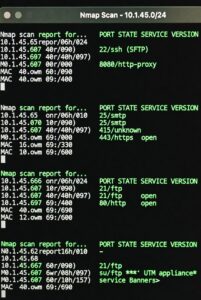
Approach the Scan Output Methodically
Examine the Nmap output line by line. Focus on open ports, service banners, and version information. Ignore extraneous details like host latency or MAC addresses unless they reveal device type. Group findings by IP address. For each IP, determine:
- The single primary service that aligns with the most common default port for that role.
- Any additional open ports that violate the one-service rule.
- Protocols that transmit credentials or data in cleartext or use deprecated versions.
Identify Devices and Assign Primary Roles
IP 10.1.45.65 runs an SFTP service on TCP/22. SFTP operates as the secure file-transfer protocol over SSH. This device serves as the SFTP server. The scan also reveals an open port at 8080, which typically hosts alternate web services or proxies. Close port 8080 immediately because the device already performs its primary SFTP role on the default SSH port. Multiple services on one host break segmentation principles and expand the attack surface.
IP 10.1.45.66 presents SMTP on TCP/25 and additional ports 415 and 443. The primary role is Email Server because SMTP on port 25 constitutes the standard mail-transfer service. Port 415 appears non-standard for email and likely supports a custom or auxiliary service. Port 443 normally delivers HTTPS, yet the hardening policy demands only default ports for the declared primary service. Disable both 415 and 443. Retain only the core SMTP listener unless the organization explicitly deploys SMTPS on 465 or submission on 587; even then, evaluate TLS enforcement separately.
IP 10.1.45.67 listens on multiple ports including 21 (FTP), 80 (HTTP), and likely others. The primary role is Web Server because port 80 represents the classic HTTP default. FTP on 21 exposes cleartext credential and file transfers, violating secure-protocol requirements. Close both port 21 and port 80. Migrate the web service to HTTPS on 443 with proper certificate management and disable FTP entirely in favor of SFTP or managed file-transfer solutions.
IP 10.1.45.68 shows FTP on port 21 along with UTM-specific banners or ports. Classify this host as the UTM Appliance because its primary function centers on unified threat management and perimeter security. The presence of FTP on 21 contradicts secure-protocol mandates and introduces unnecessary risk on a security device. Disable port 21 immediately. UTM appliances should expose only management interfaces on secure channels (SSH or HTTPS) and never run file-transfer daemons unless strictly required for isolated, authenticated operations.
Systematic Protocol and Port Remediation
Apply the hardening guidelines in this order:
- Enforce One Service per Device — Map each IP to its dominant service banner. Any secondary open port violates the rule and requires closure.
- Restrict to Default Ports — Verify the primary service uses its IANA-assigned port. Redirect or close any port-shifted instances.
- Eliminate Non-Secure Protocols — Disable FTP (21), HTTP (80), Telnet (23), and any unencrypted SMTP/IMAP/POP3 variants. Replace with SSH/SFTP, HTTPS, SMTPS, or equivalent TLS-wrapped services.
Practical Command-Line Validation You Can Replicate
Run targeted Nmap scans during practice to mirror the lab scenario:
nmap -sV -p- 10.1.45.0/24 --open
Focus on version detection (-sV) to confirm service banners. Cross-reference findings against the official port list and recommended secure alternatives.
Decision Framework for Network Hardening Labs
- Read the hardening policy first and keep it visible.
- Scan each host independently.
- Assign exactly one primary service per IP.
- List every port that must close to achieve compliance.
- Prioritize remediation by risk: cleartext protocols first, then non-default ports, then redundant services.
Master this pattern and you will rapidly dissect similar network configurations. Practice with varied Nmap outputs that include mixed secure and legacy services until the mapping process becomes automatic. This disciplined approach directly translates to real-world network hardening audits and strengthens your operational security skills.